LIFE Roleplay
Life · Discord 7 online · 25 members
Closed alpha · access guide

Get into the alpha

You can join the LIFE closed alpha and play on our servers. Follow these five steps on Discord and the team will take it from there. It takes a few minutes.

Start on DiscordStep 1 · Join the server Read the steps
IN-GAME · Palm Cliff Villas, Block Island
Before you startWHAT YOU NEED
A Discord account

Access is handled on our Discord server. The desktop app or the browser both work.

A Steam account

LIFE is on Steam. Once you're approved you get a Steam key in a private message on Discord, and you need Steam to activate it. Have your Steam name and profile link ready for the form.

A Windows PC & a microphone

Windows 11, about 50 GB of disk space and a microphone. Minimum: Core i5 (6th gen), 16 GB RAM, 8 GB graphics card. Recommended: Core i7 (9th gen), 32 GB RAM, 16 GB graphics card.

Step by stepFIVE STEPS · ALL ON DISCORD
01
Discord

Join our Discord server

Everything about the alpha happens on the LIFE Discord: access requests, announcements, new builds and bug reports.

  1. Click Join server on the card, or open discord.gg/SKQ4rsGzr6.
  2. Log in to Discord if you aren't already.
  3. Click Accept Invite.
LifeDISCORD SERVER
7 online 25 members

LIFE is an open-world roleplay game built in Unreal Engine 5, designed from the ground up as a standalone experience where players create their own stories in a living, dynamic world.

Join server discord.gg/SKQ4rsGzr6

02
#rules

Read and accept the rules

New members only see a few channels until they accept the server rules. Accepting them unlocks the rest of the server, including the alpha channel.

  1. Open rules under Info at the top of the channel list.The rules channel under the Info category
  2. Read the rules. They apply on Discord and in game.
  3. Accept the rules.
Can't see more channels?Make sure you accepted the rules. If the channel list still looks short, restart Discord.
03
#alpha-access

Open #alpha-access and click New Post

alpha-access is a forum channel. Each player asks for access in their own post, so the team can reply to you directly.

  1. Find alpha-access under Forum in the channel list.The alpha-access forum channel under the Forum category
  2. Click the blue New Post button.The New Post button
One post eachOpen one post per person. If you already have one, reply in it instead of starting another.
04
The form

Fill out the access form

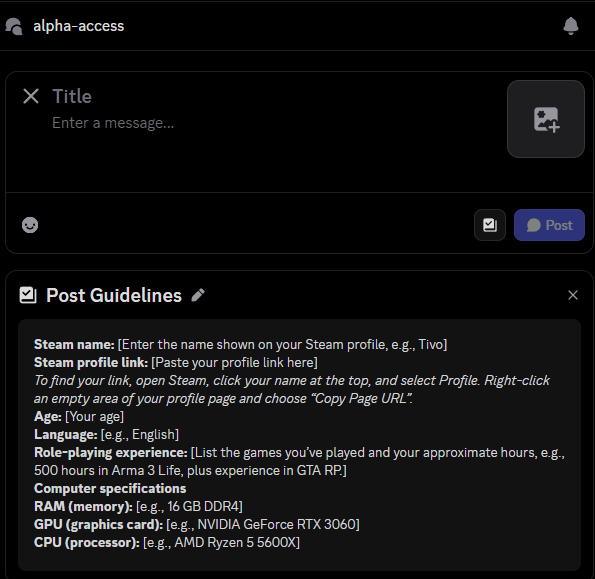
Under the new post form, Discord shows our Post Guidelines. That's the form: copy it into the message and fill in every field.

Title
Your Steam name — exactly as it shows on your Steam profile
Message
The Post Guidelines form, with every field filled in

Here's the same form, ready to copy:

Steam name: [the name shown on your Steam profile, e.g. Tivo]
Steam profile link: [paste your profile link]
Age: [your age]
Language: [e.g. English]
Role-playing experience: [games you've played and roughly how many hours, e.g. 500 h in Arma 3 Life, plus GTA RP]
Computer specifications
RAM (memory): [e.g. 16 GB DDR4]
GPU (graphics card): [e.g. NVIDIA GeForce RTX 3060]
CPU (processor): [e.g. AMD Ryzen 5 5600X]
Steam profile linkOpen Steam, click your name at the top and pick Profile. Right-click an empty part of your profile page and choose Copy Page URL.

Then click Post.

The new post form in alpha-access with the Post Guidelines form underneath
Screenshot 04The new post form with the Post Guidelines underneath.join/ss/04_new_post_form.png
04 Title = Steam name · message = the form below
05
Approval

Get approved and activate your key

That's it. The team reads every request and replies in your post. You'll hear back in one of two ways:

ApprovedYou get a Steam key in a private message on Discord. Activate it in Steam and the game appears in your library.
Invited to an interviewA short chat with the team on Discord before you get access.
Keep your DMs openThe key comes as a private message, so allow direct messages from server members on the LIFE server and turn on Discord notifications. Please don't open a second post while you wait.

Got your key? Activate it on Steam

  1. Copy the Steam key from the private message on Discord.
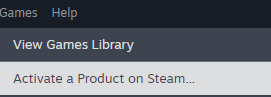
  2. Open Steam and click Games in the top menu, then Activate a Product on Steam…Steam's Games menu with Activate a Product on Steam
  3. Paste the key and follow the steps. LIFE appears in your library: install it and play.
Got in?Start with First steps on Block Island: a bank account, your first car and your first job, step by step.
See you on Block Island.

Ready to play?

Join the Discord, accept the rules and open your post in #alpha-access. While you wait, read up on the jobs and the island.

Join the Discorddiscord.gg/SKQ4rsGzr6 First steps Tutorials Knowledge